Rates
The purpose of rates are to change in flight sensitivity and rotation rates. The aim is usually to have several 'rates' that you can switch between during flight to change flight performance. Please see the profile switching example
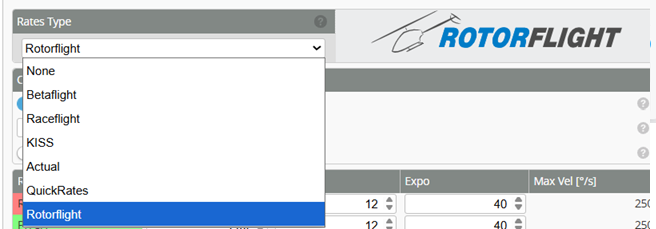
Rotorflight offers a total of six rate systems:
- Rotorflight Rates (New)
- Actual Rates
- Betaflight Rates
- Raceflight Rates
- KISS Rates
- Quick Rates
Rotorflight Rates is the new default rate system in Rotorflight. If you wish to find out more about the other rate types please review the Betaflight Rates page.
Understanding Rotorflight Rates
“Rotorflight Rates” are the default rates in Rotorflight, providing a straightforward approach to setting maximum rotational velocity (e.g., entering 250 corresponds to 250deg/sec) and center sensitivity values.
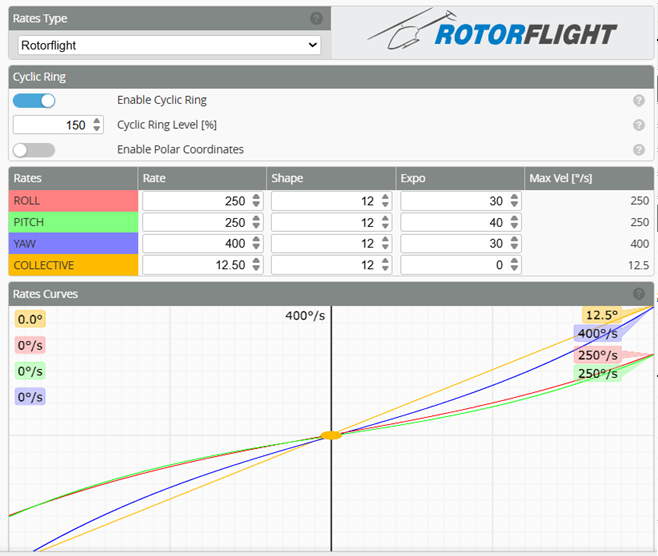
There are 3 values in Rotorflight Rates: Max Rate, Shape, Expo.
Rate
Rate defines the heli's rotation speed at full stick deflection. The value entered represents the maximum rotational velocity targeted. For example, entering 250 means your heli will attempt to rotate at 250 degrees/sec at full stick.
However, keep in mind that the maximum angular velocity can be limited by your heli mechanics. When the heli reaches its physical limitation and cannot flip any faster, the maximum angular velocity is capped, regardless of the higher value set in Rotorflight.
Expo
Expo applies a curve to flatten the response around the center stick. This reduces the sensitivity around the center while making the stick extents more aggressive.
Excessive Expo might cause decreased center stick sensitivity and make the heli’s response more unpredictable towards full stick (more jumpy).
Shape
Shape defines the shape of the Expo curve. A value of 0 corresponds to a purely exponential curve. Increasing this value flattens the curve towards the centre stick, pushing the more rapid increase in rates further out on the stick range.
Cyclic Ring

-
Cyclic Ring - The combined full pitch AND full roll results in a combined rotational rate (diagonally) that is faster than full pitch OR full roll alone. The cyclic ring setting allows you to limit the maximum combined rate when both pitch and roll are at maximum, effectively creating a "ring" of maximum rates on the stick. A value of 100 means the diagonal rate is the same as the pitch and roll (i.e. a circle).
-
Polar Coordinates - When disabled the pitch and roll rates are applied independently. When enabled, the pitch and roll rates are converted to polar coordinates.
Dynamics
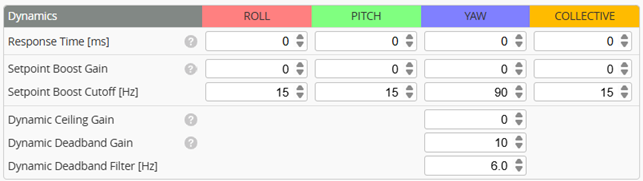
- Response Time - corresponds the smoothness of the reaction to stick inputs, also called time constant of the input filter.
High response times smooths out the input but too high could cause significant input delay.
- Setpoint Boost Gain - is a feedforward term that increases the output based on the stick input. This can be used to achieve a more responsive feel. Zero represents off. Higher values increase the feedforward and make the heli more responsive to stick inputs, but too high could make the heli feel twitchy.
- Setpoint Boost Cutoff - defines how quickly the boost decays back to zero after you move the stick. Higher cutoff → shorter boost duration → sharper, more precise feel. Lower cutoff → longer boost duration → softer but more aggressive push.
- Dynamic Ceiling gain
- Dynamic Deadband gain - Increases the stick deadband when rapidly approaching the center stick. This can be used to achieve a more precise stop when turning to center stick during rapid stick movements. Higher values increase the size of the deadband.
- Dynamic Deadband Filter
Copy Rate Profile
You can use the Copy rateprofile button at the upper right corner to copy the values of the current profile to another one.