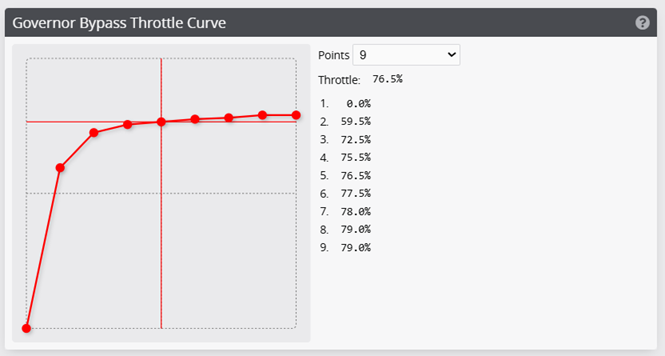
Governor Bypass
The governor bypass feature allows you to disable the governor when the Governor Bypass mode is configured and enabled. This can be used to achieve a more direct throttle response when the governor is not desired, such as during takeoff or landing, while still having the ability to use the governor at other times. This feature can be used to create a "Normal" mode. This can be used to spool up the helicopter manually and then switch to governor for aerobatic flight.
Governor setup
Set your governor up for your desired headspeed as shown in the previous examples. This will be used for your regular flight.
Bypass mode
Enable the governor bypass in the Modes Tab. Set the channel and range to suit your signals. For example, if we are setting up a "Normal Mode" we can set this to the flight mode channel at the position corresponding to our flight mode 1.

Bypass Curve
On the governor tab, you can set the bypass curve. This is the throttle curve that will be used when the governor is bypassed.